

TL;DR: Format and Design
✅ Use a single-column layout
✅ Stick to standard fonts (Arial, Calibri, Times New Roman, Garamond)
✅ Use font size 10-12pt for body text, 14-16pt for headers
✅ Avoid tables, text boxes, columns, and graphics completely
✅ Remove photos, logos, charts, and skill rating bars
✅ Use standard bullet points (• or -), not custom symbols
✅ Place contact information in the main body, not header/footer
✅ Save as .docx unless PDF is specifically requested
Content and Keywords
✅ Read the job description carefully and identify key terms
✅ Include exact keywords from the posting naturally throughout
✅ Spell out acronyms at least once, then use abbreviation
✅ Use the exact job title from the posting somewhere in your resume
✅ Include a dedicated “Skills” section with relevant keywords
✅ Match your listed skills to what’s in the job description
Structure and Organization
✅ Use standard section headers (Work Experience, Education, Skills)
✅ List experience in reverse chronological order
✅ Use consistent date formatting (pick one style and stick with it)
✅ Include clear start and end dates for all positions
✅ Briefly explain any employment gaps over 6 months
✅ Keep resume to 1-2 pages (2 pages for senior roles)
Before Submitting
✅ Proofread multiple times—ATS doesn’t know what you “meant” to write
✅ Follow all application instructions exactly
✅ Use correct file naming if specified
✅ Test your resume with a free ATS checker (Jobscan, Resume Worded)
✅ Copy-paste into plain text to see how it parses
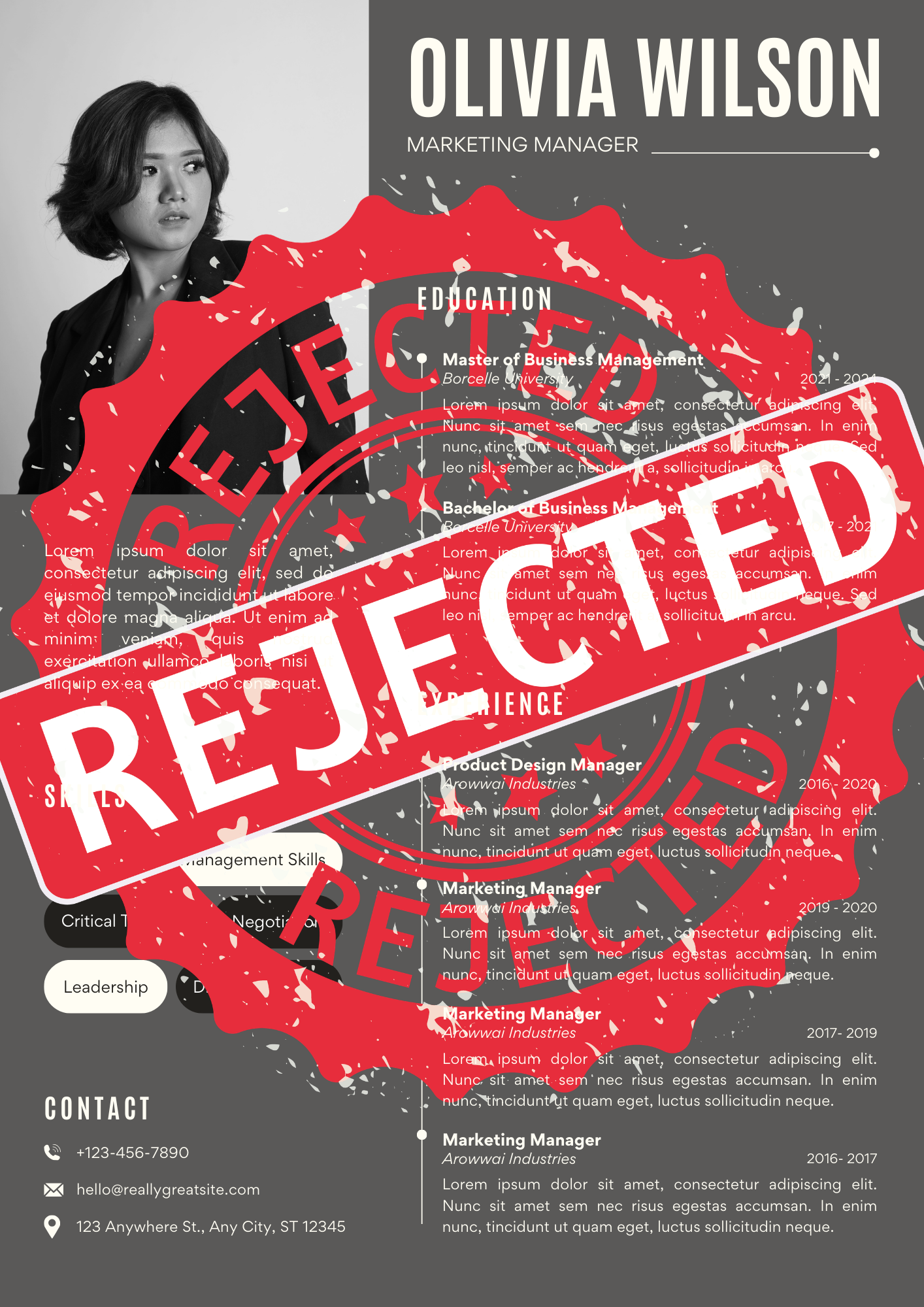
You’ve applied to 778 jobs. You’re qualified. You have the experience. Yet you keep getting rejected within hours, or even minutes, of hitting submit.
The culprit? It’s probably not your skills or experience. It’s your resume format.
Your beautifully designed resume with multiple columns, custom fonts, and creative graphics is getting automatically filtered out by ATS software. The resume looked impressive to humans but appeared nearly blank to the robots screening it.
This is happening to millions of job seekers right now. According to industry data, up to 75% of resumes never reach human eyes because they fail to pass Applicant Tracking System softwares. While this statistic is debated, what’s undeniable is that poorly formatted resumes get deprioritized, scrambled, or completely misread by these systems.
Here’s the hard truth: ATS software isn’t designed to reject you. But if your resume can’t be parsed correctly, you’re essentially invisible.
Let’s break down exactly why resumes get rejected by ATS systems. And more importantly, how to fix yours.
What Is ATS Software and Why Does It Matter?
Applicant Tracking Systems are software tools companies use to manage the flood of job applications they receive. When you hit “submit” on a job portal like Naukri, Bayt, LinkedIn, or Indeed, your resume doesn’t go straight to a recruiter’s inbox. It goes through ATS software first.
The system scans your resume to extract information like:
- Contact details
- Work experience and job titles
- Education and certifications
- Skills and keywords
- Employment dates
Major companies use systems like Workday, Greenhouse, Lever, Taleo, iCIMS, BambooHR, and SuccessFactors. Even smaller companies increasingly rely on ATS to handle application volume.
According to a Jobscan survey of 384 recruiters, 99.7% of recruiters use an ATS to filter candidates. If your resume isn’t formatted correctly, the software can’t read it. And if it can’t read it, recruiters will never see it.
The Real Problem: It’s Not Rejection, It’s Parsing Failure
Here’s what most people get wrong about ATS: the system doesn’t technically “reject” most resumes. Instead, it fails to parse them correctly.
When an ATS can’t extract your information properly, one of three things happens:
- Your data gets scrambled – Job titles end up in the skills section, dates disappear, experience gets jumbled
- Critical information goes missing – Keywords the recruiter searches for aren’t detected because they’re in a table or text box
- You rank too low to be seen – Your resume gets pushed to the bottom of hundreds of applications
The result is the same: you’re invisible. But understanding this distinction is important because it means your resume isn’t being judged and found wanting. It’s simply not being read correctly.
Why ATS Software Rejects (or Deprioritizes) Your Resume
1. Complex Formatting and Design Elements
This is the number one killer of resumes. That beautiful two-column layout with your skills in a sidebar? ATS software reads it left to right, top to bottom, which means it’s reading across both columns simultaneously and creating nonsensical gibberish.
Common formatting mistakes:
- Multiple columns – The ATS reads across columns, mixing unrelated information
- Tables – Read row by row instead of cell by cell, scrambling your data
- Text boxes – Often completely ignored by parsing algorithms (ex: Canva CVs)
- Headers and footers – Most ATS skip these entirely, so contact info placed there disappears
- Graphics and images – Photos, logos, charts, skill rating bars. All invisible to ATS
- Custom bullet points – Fancy symbols and special characters confuse the system
ATS software from 2018 or earlier (and many systems are still running on decade-old technology) are hard-coded to accept resumes in a very specific format. Over 200 different ATS platforms exist, and none of them work well with complex formatting.
2. Missing or Mismatched Keywords
Here’s the harsh reality: if you don’t include the exact keywords from the job description, the ATS may not recognize that you have the required skills.
The keyword problem:
- Job posting asks for “project management” but you wrote “managed projects” – no match
- You used “CPA” but the system searches for “Certified Public Accountant” – not found
- You have Python experience but called it “scripting and automation” – missed opportunity
A real-world example: A tech lead discovered his company’s ATS was auto-rejecting all candidates for three months because it was filtering for “AngularJS” (an outdated framework) when they actually needed “Angular” (the modern version). Two different technologies, but the ATS didn’t know the difference.
Half the HR team was fired. The company lost months of potential hires.
How to fix it:
- Read the job description carefully and identify key terms
- Include both acronyms AND full terms (“Project Management Professional (PMP)”)
- Use exact job titles from the posting
- Incorporate technical skills using the same terminology the job uses
- Don’t keyword stuff—use terms naturally throughout your experience descriptions
3. Wrong File Format
File format matters more than you think. While modern ATS systems can handle PDFs, many still struggle with them—especially if your PDF is image-based (like a scanned document) rather than text-based.
File format rules:
- Best: .docx (Microsoft Word) – Most reliably parsed across all ATS platforms
- Usually safe: Text-based PDF created from Word/Google Docs
- Never: Scanned PDFs, .jpg, .png, image files, or uncommon formats like .rtf or .pages
If you must use PDF, make sure it’s exported directly from your word processor, not scanned. Always check the job posting instructions. If they specify a format, use it.
4. Inconsistent Date Formatting
ATS systems parse dates to calculate your employment duration. Inconsistent formats confuse the software and can cause your entire work history to be miscalculated or ignored.
Wrong:
- “March 2023 – Present”
- “2023/03 – Present”
- “Mar. ’23 – Present”
Right:
- “03/2023 – Present” (consistent throughout)
- “March 2023 – Present” (consistent throughout)
Pick one format and stick with it across your entire resume.
5. Non-Standard Section Headers
ATS software looks for specific section names to categorize your information. If you get creative with headers, the system won’t know where to put your data.
What ATS expects:
- Work Experience (or Professional Experience)
- Education
- Skills
- Certifications (or Licenses)
- Professional Summary
What confuses ATS:
- “My Journey” instead of Work Experience
- “What I Bring to the Table” instead of Skills
- “Academic Background” instead of Education
Keep it simple. Standard headers exist for a reason.
6. Acronyms Without Explanation
Using only acronyms can cause ATS to miss your qualifications entirely. The system might search for “Bachelor of Science” but your resume only says “B.S.” – no match found.
Best practice: Include both forms at least once
- “Developed application programming interfaces (APIs) for electronic data interchange (EDI)”
- “Project Management Professional (PMP) certified”
- “Bachelor of Science (B.S.) in Computer Science”
7. Employment Gaps and Unexplained Breaks
While ATS doesn’t technically reject resumes for gaps, it does struggle to process them if they’re not explained. This can affect parsing accuracy and make your timeline appear jumbled.
How to handle gaps:
- Include clear start and end dates for every position
- For gaps over 6 months, add a brief entry: “Freelance Consulting” or “Professional Development” or “Family Care”
- Be honest but strategic. You don’t need to over-explain
8. Ignoring Application Instructions
Sometimes rejection happens because candidates don’t follow basic instructions. Job postings often specify:
- Required file naming conventions (“LastName_Position_Resume.pdf”)
- Maximum page length (2 pages)
- Specific sections to include
- Required file format
If the posting says “2-page maximum” and you submit 4 pages, many ATS systems will flag you as non-compliant immediately.
How to Fix Your Resume: The ATS Optimization Checklist
Format and Design
✅ Use a single-column layout
✅ Stick to standard fonts (Arial, Calibri, Times New Roman, Garamond)
✅ Use font size 10-12pt for body text, 14-16pt for headers
✅ Avoid tables, text boxes, columns, and graphics completely
✅ Remove photos, logos, charts, and skill rating bars
✅ Use standard bullet points (• or -), not custom symbols
✅ Place contact information in the main body, not header/footer
✅ Save as .docx unless PDF is specifically requested
Content and Keywords
✅ Read the job description carefully and identify key terms
✅ Include exact keywords from the posting naturally throughout
✅ Spell out acronyms at least once, then use abbreviation
✅ Use the exact job title from the posting somewhere in your resume
✅ Include a dedicated “Skills” section with relevant keywords
✅ Match your listed skills to what’s in the job description
Structure and Organization
✅ Use standard section headers (Work Experience, Education, Skills)
✅ List experience in reverse chronological order
✅ Use consistent date formatting (pick one style and stick with it)
✅ Include clear start and end dates for all positions
✅ Briefly explain any employment gaps over 6 months
✅ Keep resume to 1-2 pages (2 pages for senior roles)
Before Submitting
✅ Proofread multiple times—ATS doesn’t know what you “meant” to write
✅ Follow all application instructions exactly
✅ Use correct file naming if specified
✅ Test your resume with a free ATS checker (Jobscan, Resume Worded)
✅ Copy-paste into plain text to see how it parses
The Bottom Line: Make It Easy for the Robots (So You Can Impress the Humans)
ATS software isn’t your enemy. Iit’s just software doing what it’s programmed to do. The problem is that most people format their resumes for human readers without considering that a robot reads it first.
The solution isn’t to “trick” the ATS or game the system. It’s simply to make your resume readable by both machines and humans. That means:
- Simple, clean formatting that parsing algorithms can handle
- Relevant keywords that match what the system is searching for
- Standard structure that the software expects
- Accurate information presented clearly
Once you pass the ATS filter, your resume still needs to impress the human recruiter. But if you never get past the first screening, your qualifications don’t matter.
Don’t let a poorly formatted resume keep you invisible. Fix the format, optimize the keywords, and give yourself a fighting chance.
Tired of formatting resumes for ATS compatibility? ApplyIn5 automatically generates ATS-optimized resumes with job-specific keywords for every application, giving you the best of both worlds without the manual work. Learn more at ApplyIn5.com.