
CV Optimization
Stop Using Canva Resumes. It’s Killing Your Job Search.
Your Canva CV looks polished in the preview. But the moment an ATS scanner touches it, the formatting collapses, the columns vanish, and your experience reads as garbled nonsense. Here is exactly what happens and what to use instead.
Canva and other graphic design tools produce visually attractive CVs that ATS systems cannot reliably parse. Multi-column layouts, text boxes, icons, and embedded graphics cause ATS parsers to misread or skip your content entirely. Recruiters at many UAE and Indian companies use Naukri, Bayt, and similar portals that run your CV through an automated parser before a human ever sees it. A plain, well-structured CV in DOCX or simple PDF format will consistently outperform a beautiful Canva design. ApplyIn5 generates ATS-optimised CVs tailored per job automatically, so you never have to guess whether your formatting will survive the scanner.
What actually happens when ATS reads your Canva CV
Most people picture a recruiter opening your CV, scrolling through it, and deciding whether to call you. That image is wrong for the vast majority of applications. Before any human sees your file, an Applicant Tracking System parses it. The ATS extracts your name, contact details, work history, education, and skills into structured database fields. What it cannot extract, it discards.
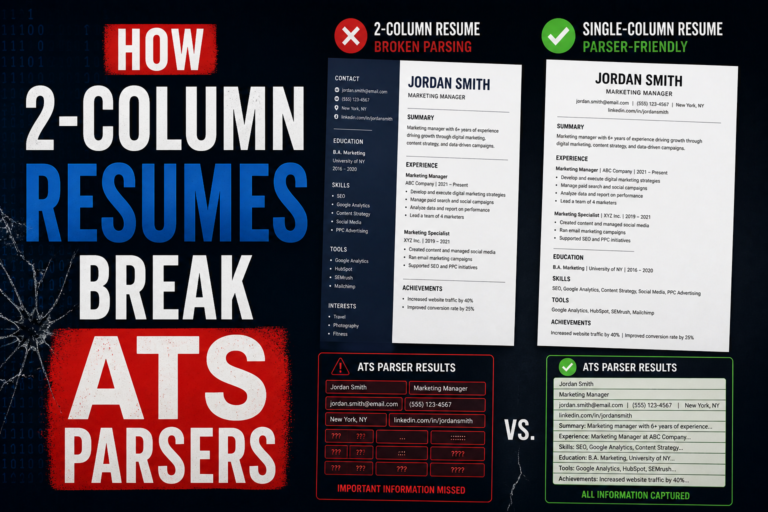
Canva builds CVs using a design engine built for visual output, not structured text. When you export a Canva CV to PDF, the underlying file contains text rendered inside graphic containers, decorative elements layered over content, and columns built with absolute positioning rather than semantic document structure. An ATS does not see a clean two-column layout. It sees a flat stream of characters, often in the wrong order, sometimes missing entirely.
The result: your skills section might be read before your name. Your job titles might be merged with the company names from the adjacent column. Your contact details, if placed inside a header graphic, might not be read at all. You submitted a complete, accurate CV. The ATS stored something that barely resembles it.
If your Canva CV uses text boxes, icons for section headers, or a sidebar column, assume an ATS will misread it. Many portals, including Naukri and Bayt, run every uploaded CV through a parser before displaying it to recruiters. What the recruiter sees is the parsed version, not your original file.
The numbers behind rejected applications
Understanding the scale of the problem helps explain why so many qualified candidates never hear back. The data is uncomfortable, but it is the reality of modern hiring at scale.
These numbers mean that getting past the ATS is the first filter, not the final one. A beautiful Canva design that fails at step one is irrelevant by definition. Even if a company did not use an ATS, the recruiter would still receive a properly structured DOCX faster and read it more easily than a decorative PDF.
The counterargument you will often hear is that creative industries appreciate design-forward CVs. This is sometimes true for graphic designers, art directors, or brand managers at boutique agencies. For virtually every other role, including finance, engineering, operations, sales, marketing, and technology, a well-structured plain CV wins over a designed one every time.
Five specific ways Canva CVs break ATS parsers
The problems are not random. They follow predictable patterns based on how Canva builds its templates. Here are the five most common failure modes.
1. Multi-column layouts confuse reading order
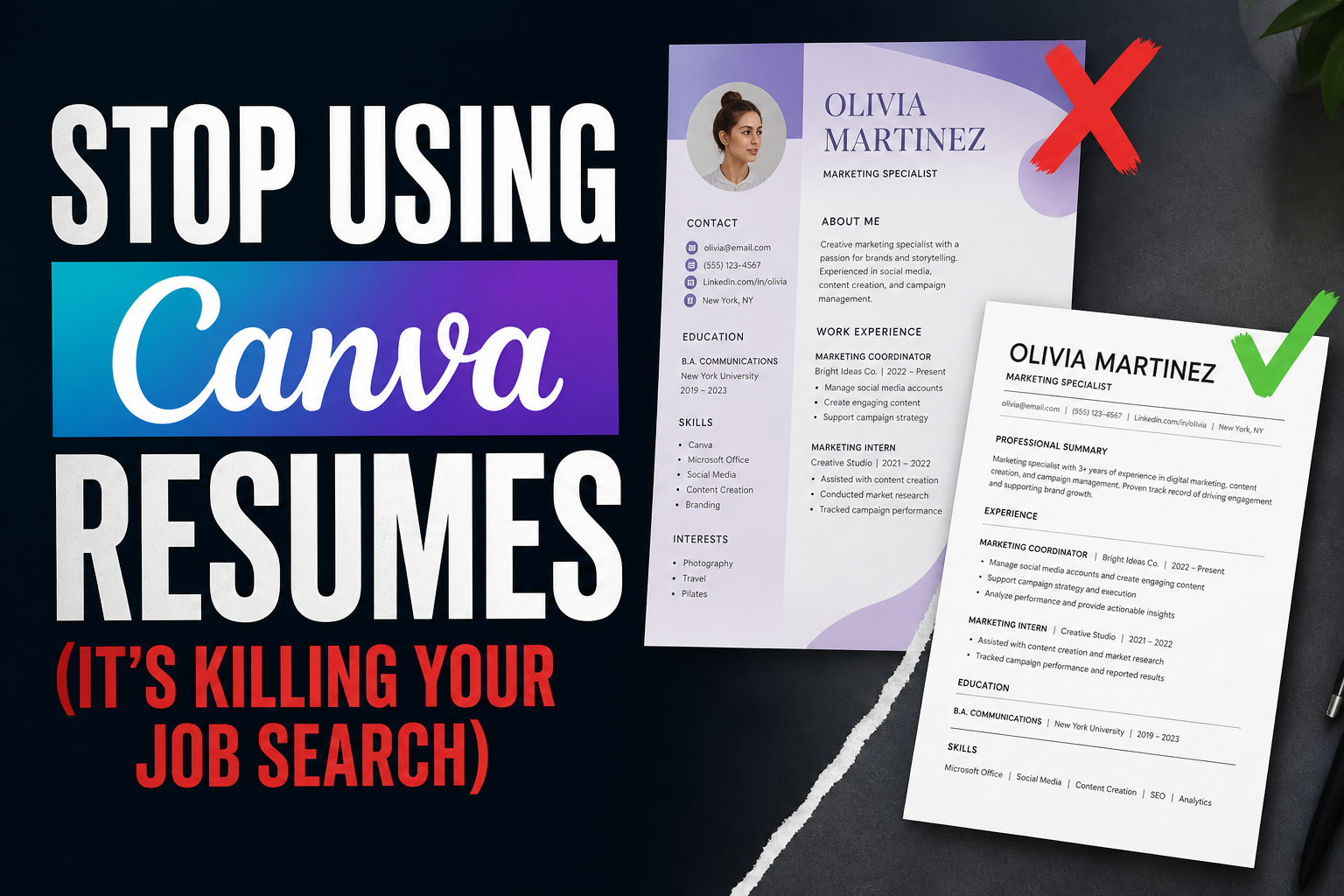
Canva’s most popular CV templates use a two-column design: contact and skills on the left, work history on the right. An ATS reads text sequentially across the page, not column by column. It often reads the first line of the left column, then the first line of the right column, then the second line of the left column, and so on. Your job title, employer, and dates end up scrambled in the extracted text. The ATS may store your current role as something like “Software Engineer FinanceSenior Developer XYZ Corp 2022” because it merged content from both columns on the same horizontal line.
2. Text boxes are often invisible to parsers
Canva lets you place text anywhere using floating text boxes. These are design elements, not document text. Many ATS parsers treat them as graphics and skip them entirely. If your summary, skills list, or contact information sits in a Canva text box rather than in a proper document text flow, the parser may never read it. You could have five years of relevant experience that the ATS records as blank.
3. Icons and graphics replace readable labels
Canva templates frequently use icons to indicate sections: a briefcase for work experience, a graduation cap for education, a phone icon for contact. These icons are not text. ATS parsers cannot infer meaning from an image. If your section header is an icon rather than the word “Experience” or “Education,” the parser cannot identify what the following content represents. It may categorise everything as miscellaneous or skip the section entirely.
4. Fancy fonts fail to render in plain text extraction
Canva uses custom web fonts that are embedded in the PDF. When an ATS extracts text, it works from the underlying character data, not the visual rendering. If the font encoding is non-standard, some characters may extract as question marks, boxes, or the wrong letters. This is rare with basic Latin characters, but it happens with special characters, accented letters (relevant if your name has an accent), and certain punctuation styles.
5. Headers and footers are often ignored
Many Canva templates place the candidate’s name and contact details in a large decorative header block. Some parsers skip headers and footers entirely, treating them as boilerplate. Your name and email could be completely absent from the parsed data. The recruiter’s ATS shows a CV with no contact information. They cannot call you even if they wanted to.
The safest test: open your Canva PDF in a plain text editor or copy-paste it into a blank Notepad file. What you see is roughly what an ATS parser extracts. If the text is scrambled, out of order, or missing sections, your CV has a parsing problem.
Why this matters more in UAE and India
In the US and UK, many companies have moved toward more modern ATS platforms that handle formatted PDFs slightly better. In the UAE and India, the picture is different. Naukri, the dominant job portal in India with 70 million-plus registered users, runs every uploaded CV through its own parsing engine. Bayt, the largest portal in the UAE and wider Middle East, does the same. The parsed data populates recruiter search results. When a recruiter on Naukri searches for “Python developer, 3 to 5 years experience, Bangalore,” they see results based on what the parser extracted, not what you wrote.
If your Canva CV failed to parse your skills section properly, you simply do not appear in that search. The recruiter never knows you exist. You never know why you did not hear back. You apply to another 40 jobs and wonder why nothing is working.
The same problem exists on GulfTalent, Dubizzle Jobs, and Monster Gulf. These portals were built for volume, not design. Their parsers are built around structured DOCX and simple PDF files. They were never designed to handle graphic design exports.
ApplyIn5 generates ATS-optimised CVs tailored to each job’s specific keywords and requirements. The output is always a clean, parser-friendly format that works on Naukri, Bayt, GulfTalent, and 100-plus other portals. No more guessing whether your design will survive the parser.
What a good ATS-safe CV actually looks like
ATS-safe does not mean ugly. It means structured. The goal is a document that both a machine and a human can read without friction. Here is what that looks like in practice.
Use a single-column layout. Every section runs top to bottom. Work history, education, skills, and contact details all sit in the same vertical flow. There are no sidebars, no floating elements, no columns. Single-column documents parse reliably across every ATS platform.
Use standard section headers. Write “Work Experience,” “Education,” “Skills,” and “Contact.” Do not replace these with icons. Do not get creative with headings like “My Journey” or “What I Bring.” ATS systems identify sections by matching header text against known patterns. Standard language works. Creative language often does not.
Use DOCX format where possible. PDF is acceptable if it is exported from Word or Google Docs with text-as-text rather than text-as-image. Never use Canva’s PDF export for ATS submissions. If a portal asks you to paste your CV into a text field, copy from your DOCX, not from a PDF.
Keep formatting minimal. Bold your job titles and employer names. Use bullet points for responsibilities. Do not use tables, text boxes, or columns. Standard fonts only: Arial, Calibri, Times New Roman, or Georgia. Font size 10 to 12 for body text, 14 to 16 for your name.
A CV that looks plain to the eye but parses cleanly will get you more interviews than a beautiful Canva design that ATS software scrambles. Recruiters cannot call you based on a design they never see.
Format comparison: Canva vs plain DOCX vs ApplyIn5
To make the tradeoffs concrete, here is how the three common approaches compare across the criteria that actually matter for your job search in the UAE and India.
| Criteria | Canva PDF | Plain DOCX | ApplyIn5 CV |
|---|---|---|---|
| ATS parse accuracy | Low to very low | High | High |
| Works on Naukri / Bayt | Unreliable | Yes | Yes |
| Job-specific keyword matching | Manual only | Manual only | Automatic per job |
| Time to produce | 30 to 60 min | 20 to 40 min | Under 2 min |
| Visual appeal | High | Medium | Clean and professional |
| Interview conversion rate | Low (parsing fails) | Medium | Highest (tailored keywords) |
The visual appeal row is the one Canva users fixate on. But it is the least important row in the table. A recruiter who never sees your CV because the ATS discarded it is not impressed by your colour palette.
Before (Canva)
Applies to 50 jobs on Naukri. Beautiful two-column CV with icons and a teal sidebar. Gets callbacks from 1 to 2 companies. Spends weeks wondering what went wrong.
After (ATS-optimised)
Switches to a clean, keyword-tailored CV for each application. Same 50 applications. Gets callbacks from 8 to 12 companies. Same experience, different format.
Frequently asked questions
- Does Canva have an ATS-friendly CV template?
- Canva has added some templates labelled “ATS-friendly,” but the underlying file format is still a design-first PDF export. Even with simpler layouts, Canva PDFs regularly fail ATS parsers because of how the tool constructs its output files. If ATS compatibility is your goal, a plain DOCX built in Word or Google Docs is more reliable than any Canva template.
- Can I use a Canva CV for hand-delivered or email applications?
- If a recruiter will open your file directly without any ATS system involved, a Canva CV is less of a problem. Many small businesses in the UAE and India hire through direct email or WhatsApp referrals. In those cases, design can make a positive impression. The risk is that you cannot always know which companies use ATS and which do not. Maintaining two versions, one designed and one plain, is the safest approach.
- Will a plain text CV hurt my chances if the recruiter does see it?
- A clean, well-structured plain CV does not look amateur to a recruiter. What looks amateur is poor formatting, typos, and generic content. A simple layout with strong, specific achievements reads as confident and clear. Recruiters spend 6 seconds on initial review. They are scanning for role, company, years of experience, and one or two standout points. None of that requires a designed template.
- Do creative roles need a Canva CV?
- Graphic designers, UX designers, and visual creatives should maintain a portfolio link alongside their CV, not replace the CV with a designed document. Even for creative roles, many companies still use ATS portals. The portfolio demonstrates your design skill. The CV just needs to parse correctly. A link to your Behance or portfolio site does the creative work without putting your application at ATS risk.
- What format should I use for Naukri and Bayt specifically?
- Both Naukri and Bayt recommend DOCX format explicitly. If you must use PDF, create it by exporting from Word or Google Docs, not from Canva or any other design tool. Naukri’s parser in particular struggles with complex PDF structures. A standard DOCX gives you the cleanest parse result on both platforms.
Your CV is the first filter. Make sure it passes.
ApplyIn5 generates a clean, ATS-optimised CV tailored to each job you apply for in seconds. No Canva templates. No parsing failures. Just applications that actually reach recruiters.
Apply smarter, get hired faster →